LAMINATE by Sentinel

Understand the scan.
See what changes.

LAMINATE brings single timepoint analysis, longitudinal analysis and interactive review together for multiple sclerosis MRI research: analyse a session, compare it with a follow-up, and review every lesion in one place.

For researchers, hospitals and imaging teams. Research and educational use; not FDA-approved.

a real screen, not a mock-up

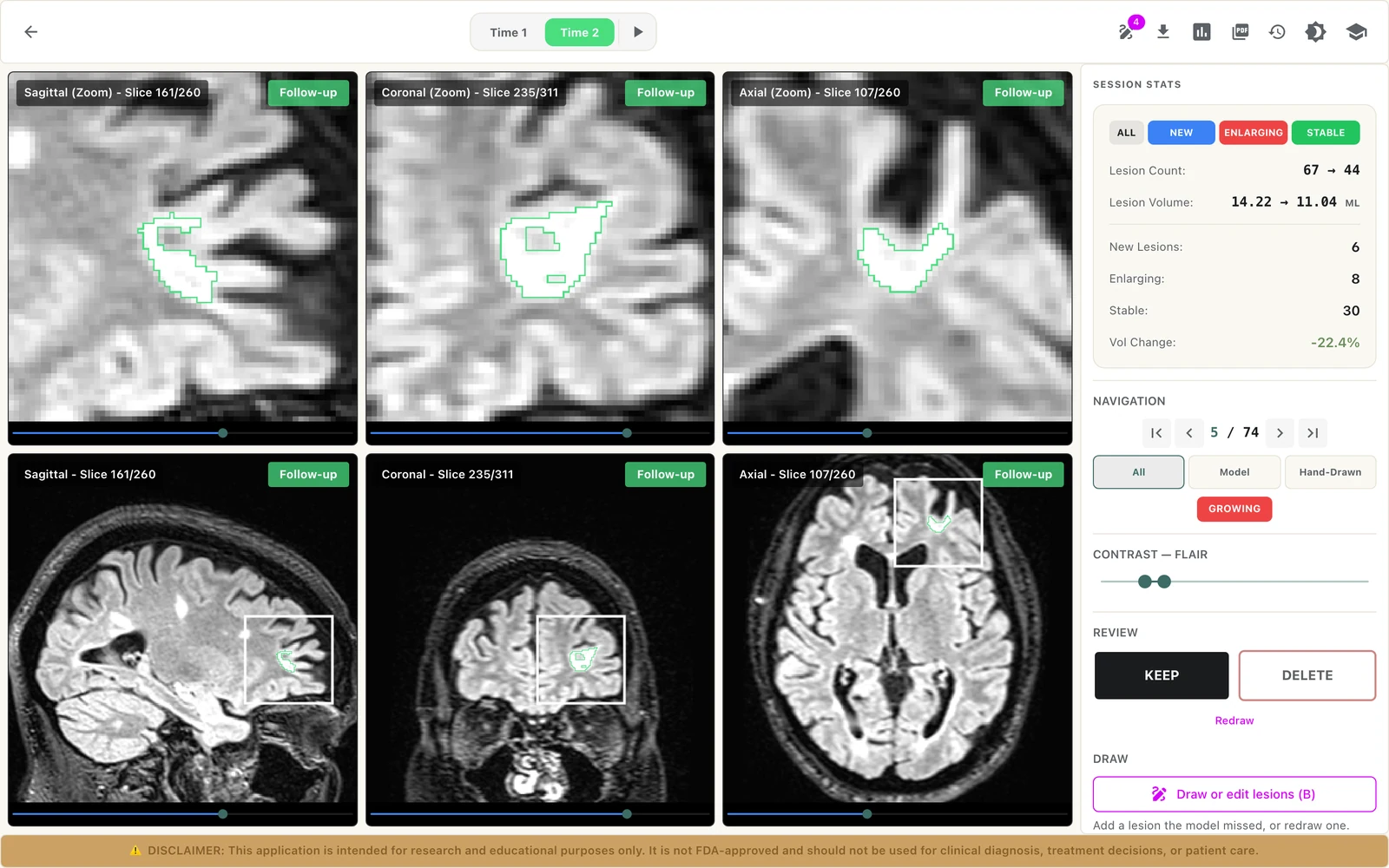
The LAMINATE Longitudinal Viewer: the follow-up session with a growing lesion outlined in three planes, session statistics and keep or delete buttons
  1. 01Switch between baseline and follow-up.
  2. 02Each lesion is outlined in all three planes.
  3. 03Lesion count, volume and change across the two sessions.
  4. 04Each lesion’s status: new, growing, shrinking, static or gone.
  5. 05Keep or delete a lesion; the report follows your decisions.
The Longitudinal Viewer in LAMINATE.
  1. 01Single timepoint analysis

    FLAIR and SWI become a FLAIR* image, with optional AI lesion segmentation.

  2. 02Longitudinal analysis

    Every lesion labelled new, growing, shrinking, static or gone.

  3. 03Interactive review

    Keep, reject and correct each lesion, then generate the report.

Every session has a story.
Connect the timepoints.

LAMINATE brings lesion analysis and review into the same workflow, whether you are exploring one MRI session or following changes across sessions.

01 / Single timepoint analysis

Understand one session.

FLAIRSWIbecomeFLAIR*

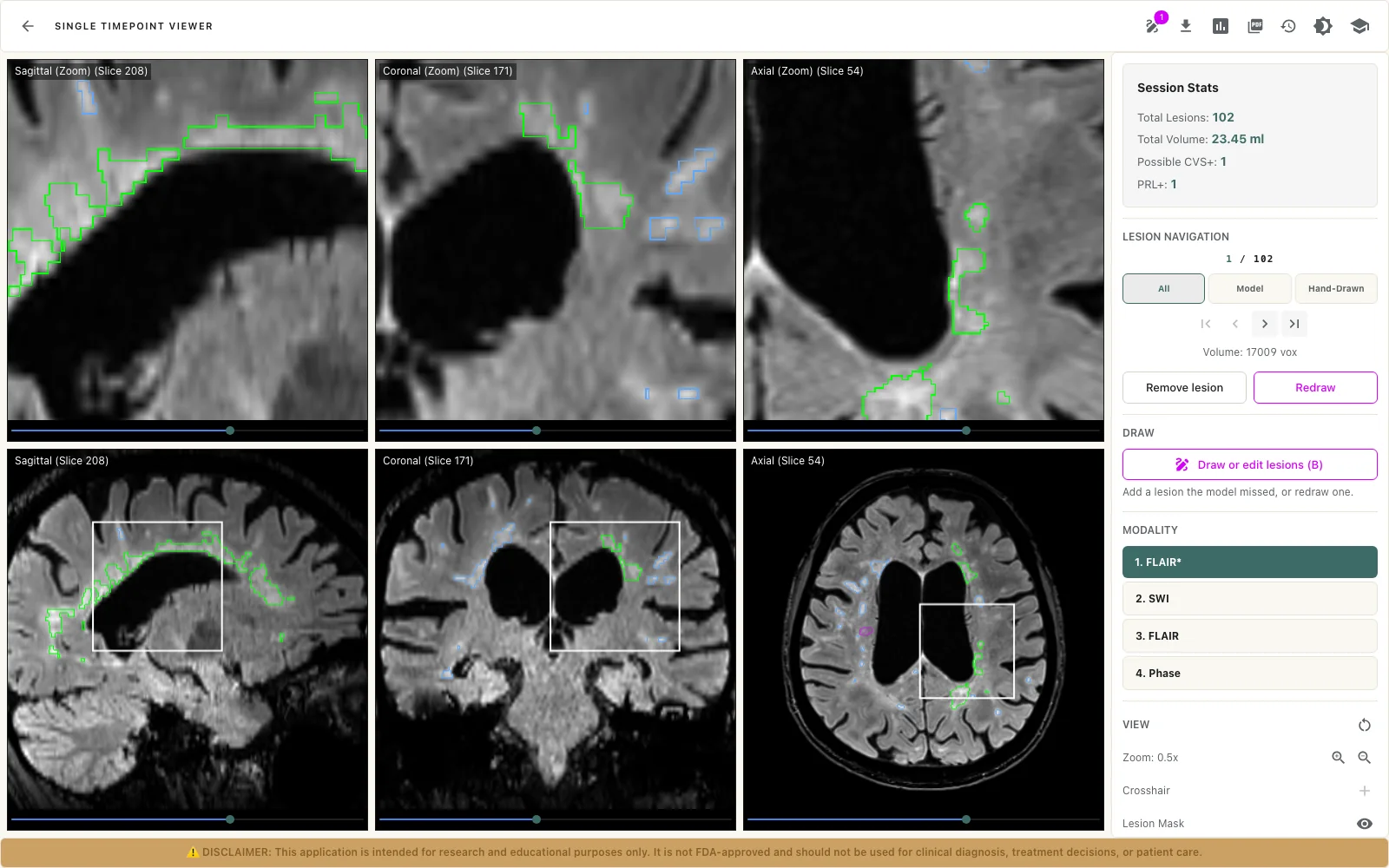
From one session. Veins within lesions become easier to see, with optional AI lesion segmentation to review.

  • FLAIR* image from FLAIR and SWI
  • Optional AI lesion segmentation
  • Central vein sign and paramagnetic rim scored by you
Explore single timepoint analysis
The LAMINATE Single Timepoint Viewer: the FLAIR* image in three planes with lesion outlines, and on the right the session statistics, lesion navigation, drawing tools and modality choices
FLAIR* in the Single Timepoint Viewer: lesions outlined in three planes, with the statistics, lesion navigation and modality choices on the right.

segmentation is optional, per analysis
02 / Longitudinal analysis

Follow changes over time.

Compare a baseline and a follow-up session of the same subject. Each lesion is labelled new, growing, shrinking, static or gone, with lesion count, volume and percent change in lesion load.

  • Baseline and follow-up comparison
  • New, growing, shrinking, static or gone
  • A report of count, volume and change
Explore longitudinal analysis

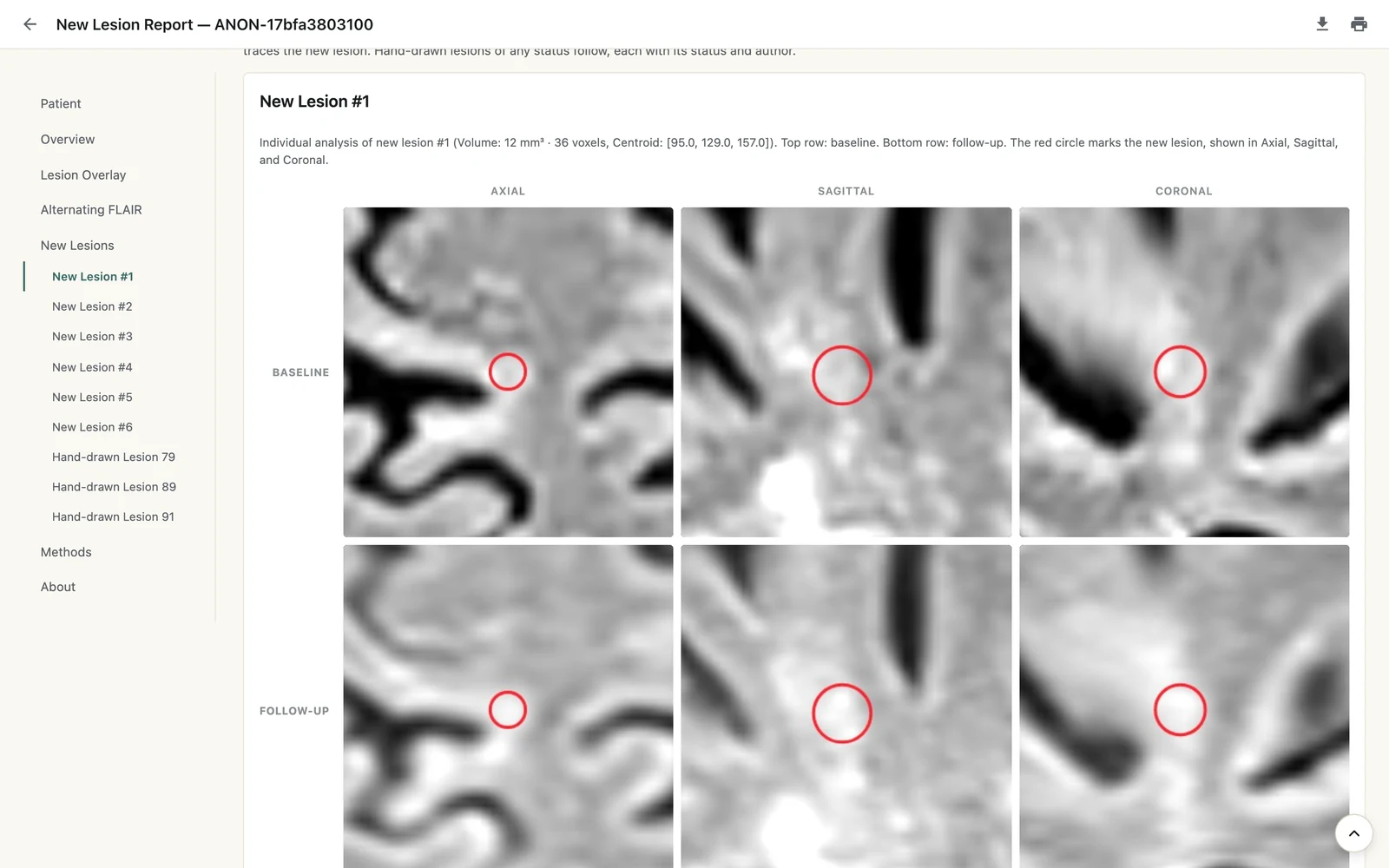
each new lesion, before and after

A LAMINATE report page showing one new lesion at baseline and at follow-up in axial, sagittal and coronal views, circled in red
In the report, each new lesion is shown at baseline and at follow-up, in three planes.

Analysis you can explore.

Step through lesions, keep or reject each one, and correct lesion masks. Edits save automatically with a version history. LAMINATE supports the review while human interpretation stays part of the workflow.

One path from study
to report.

Studies reach LAMINATE from your PACS through an on-site gateway, or as an archive you upload. Either way the result is the same workspace.

  1. 01

    Your scanners and PACS

    Studies leave over DICOM, or you upload a DICOM archive in the browser.

  2. 02

    On-site gateway

    Patient identifiers are replaced before anything leaves your network.

  3. 03

    Analysis

    Single timepoint on one session, or longitudinal on two, on GPU servers.

  4. 04

    Review

    Step through lesions in the viewer: keep, reject, correct, score.

  5. 05

    Report

    View it, download HTML or save a PDF. Single timepoint results can return to PACS.

  6. the gateway runs at your site

Archives uploaded in the browser are de-identified when they are ingested. Data in the cloud is pseudonymized, not anonymous.

Less switching.
More understanding.

Move from the changes between sessions to lesion-by-lesion review and the report. The images and the numbers stay in context.

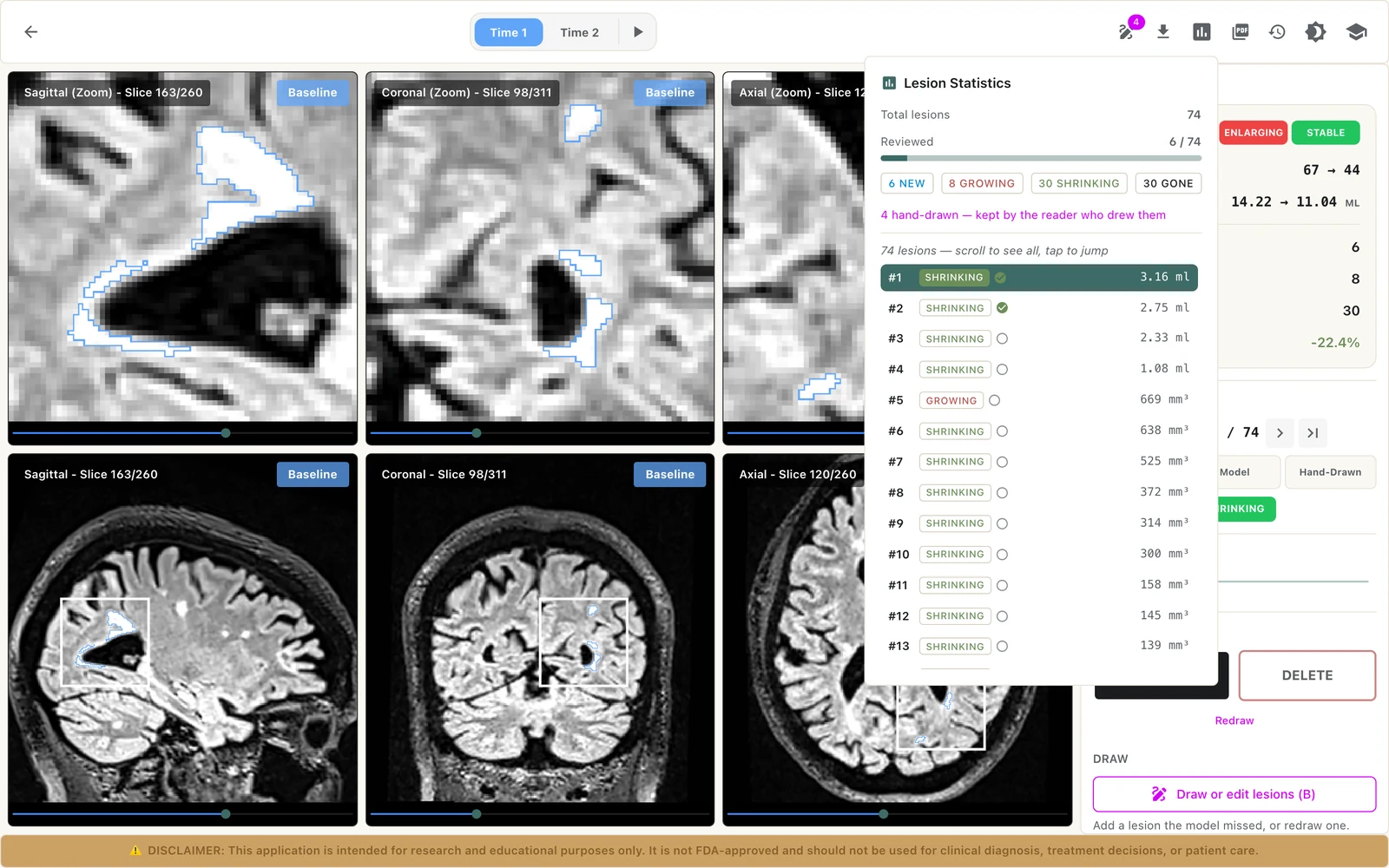
The Longitudinal Viewer with session statistics, lesion navigation and keep or delete buttons
Longitudinal Viewer
The lesion statistics: lesions reviewed, counts by status and a list of every lesion with its volume
Lesion list
A report page showing a new lesion at baseline and at follow-up in three planes
Report
01 / 03

See what changes.

Switch between baseline and follow-up, with each lesion outlined in all three planes and labelled new, growing, shrinking, static or gone.

Longitudinal Viewer.
Screens from LAMINATE

How teams use
LAMINATE.

A research group

From an archive to a scored cohort.

Upload DICOM archives into a workspace, run single timepoint analyses, and score each lesion for central vein sign and paramagnetic rim in the viewer.

  1. Upload archives
  2. Run single timepoint analysis
  3. Score and report
A hospital imaging team

From the PACS to the changes between visits.

Connect your PACS through the on-site gateway. When a baseline and a follow-up arrive together, a longitudinal analysis can start on its own, ready to review lesion by lesion.

  1. Connect the gateway
  2. Baseline and follow-up arrive
  3. Review the changes

LAMINATE, where
your team needs it.

Start on the web. Add an on-site gateway when studies should flow from your PACS. Need LAMINATE inside your own environment? Talk to us.

The LAMINATE viewer open in the browser
Web workspace

A workspace on the web.

Sign in on the web to upload studies, run analyses and review the results.

See the web workspace in a demo.
On-site gateway

Studies from your PACS.

A small container at your site receives studies over DICOM, replaces patient identifiers before anything leaves your network, and can send results back.

Setup agreed with your IT team.

The right setup starts with a conversation.

Bring your review process and organizational requirements.

A few useful answers.

Have a question specific to your team?
Bring it to the demo.

What is LAMINATE?

LAMINATE is Sentinel Cloud Service’s web platform for analysing brain MRI in multiple sclerosis research. Single timepoint analysis, longitudinal analysis and interactive review are parts of one product, in one workspace.

What do we need to run an analysis?

Single timepoint analysis needs one MRI session with a FLAIR and an SWI series. Longitudinal analysis needs two sessions of the same subject, each with a FLAIR and a T1-weighted series. Studies come in as DICOM, either as an uploaded archive or through the on-site gateway connected to your PACS.

Can we compare scans over time?

Yes. Longitudinal analysis compares a baseline and a follow-up session and labels each lesion as new, growing, shrinking, static or gone. It compares two sessions at a time; trends across several visits are not part of LAMINATE yet.

Can we review and edit the results?

Yes. In the viewers you step through lesions, keep or reject them and correct lesion masks, and for single timepoint analysis you score central vein sign and paramagnetic rim by hand. Edits save automatically with a version history. Review stays with your team: LAMINATE does not make a diagnosis.

How is patient data protected?

Studies that arrive through the on-site gateway have patient identifiers replaced before anything leaves your network, and the original identity stays with you. Uploaded archives are de-identified when they are ingested. Data in the cloud is pseudonymized rather than anonymous, and text burned into image pixels is not removed, so scanners should be configured accordingly.

Is LAMINATE approved for clinical use?

No. LAMINATE is intended for research and educational use. It is not FDA-approved and should not be used for clinical diagnosis, treatment decisions or patient care.

LAMINATE / Demo

Let’s explore your workflow.

Tell us a little about your team and we’ll shape the conversation around it. Please don’t include any patient information.

What would you like to explore?

An overview of the analysis and review experience.

Prefer to choose a time? Book a slot directly.